Skip to content
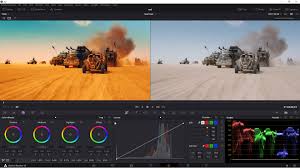
- DaVinci Resolve
- Adobe Premiere Pro (Lumetri Color)
- Why use it: If you’re already editing in Premiere Pro, Lumetri Color gives you good color grading tools without switching software. HitPaw
- Pros: Real-time grading, LUT support, integrated with other Adobe apps. Wbcom Designs
- Cons: Subscription-based; less “deep” control compared to Resolve. Wbcom Designs
- Final Cut Pro (Mac-only)
- Why it’s good: Optimized for macOS, very fast, good for creative / cinematic grading. HitPaw
- Tools: Color wheels, curves, masks, selective color correction. Wbcom Designs
- Cons: Only for Mac; one-time cost is high. Wbcom Designs
- Red Giant Magic Bullet (Colorista / Suite)
- What it is: A plugin suite (for Premiere, After Effects, Final Cut, etc.) for cinematic looks, color correction, film emulation. PremiumBeat+1
- Pros: LUTs, built-in film looks, color keying, very versatile. PremiumBeat
- Cons: Additional cost; requires a host NLE.
- Wondershare Filmora
- Why use it: Beginner-friendly, good for fast workflows. Wondershare Filmora+1
- Color grading tools: Includes scopes, LUTs, exposure, saturation, vectorscopes, histogram. Movavi
- Cons: Not as powerful / granular as Resolve or Colorista.
- VEGAS Pro
- Color tools: Includes waveform, vectorscope, histograms, Bézier masking etc. VideoProc
- Good for: Windows editors who already use VEGAS for editing.
- Kdenlive (Open Source)
- Pros: Free, open-source video editor with decent color correction abilities. Wikipedia
- Cons: Not as advanced or polished as professional color grading tools.
My Recommendation (Based on Use Case)
- If you want professional-grade color grading: Go with DaVinci Resolve.
- If you already use Premiere Pro: Use Lumetri Color + consider Magic Bullet for more stylized looks.
- If you’re on Mac and want speed: Final Cut Pro is very good.
- If you’re a beginner or doing YouTube / social content: Filmora or Kdenlive might be enough.